This is the complete list of packages that should be downloaded for enabling restricted packages -Ubuntu Restricted Extras- in Ubuntu 9.04,the Jaunty Jackalope.This list is meant for offline Ubuntu users who opt for downloading packages through another PC.No dependency issue will arise here.All dependent packages for a freshly installed system are listed here.
There are 60 packages.I think total size of all packages may come around 50MB.
You can download packages from http://packages.ubuntu.com
Here I'v linked to http://archive.ubuntu.com repository.Click to download packages. For other servers check http://packages.ubuntu.com
##############################################
##############################################
cabextract_1.2-3_i386
flashplugin-installer_10.0.22.87ubuntu2_i386
flashplugin-nonfree_10.0.22.87ubuntu2_i386
freepats_20060219-1_all
libavutil-unstripped-49_0.svn20090303-1ubuntu2+unstripped1_i386
libfaac0_1.26-0.1ubuntu2_i386
libfaad0_2.6.1-3.1_i386
libmp3lame0_3.98-0.0_i386 (uff mp3!)
libx264-65_0.svn20081230-0.0ubuntu1_i386
libxvidcore4_1.1.2-0.1ubuntu3_i386
libavcodec-unstripped-52_0.svn20090303-1ubuntu2+unstripped1_i386
libavformat52_0.svn20090303-1ubuntu6_i386
libpostproc51_0.svn20090303-1ubuntu6_i386
libswscale0_0.svn20090303-1ubuntu6_i386
gstreamer0.10-ffmpeg_0.10.6.2-1ubuntu2_i386
gstreamer0.10-pitfdll_0.9.1.1+cvs20080215-1ubuntu1_i386
libenca0_1.9-6_i386
libass1_0.9.5-2_i386
libcdaudio1_0.99.12p2-7_i386
libcelt0_0.5.1-0ubuntu1_i386
libdc1394-22_2.0.2-1_i386
libdca0_0.0.5-0.1_i386
libdvdread4_4.1.3-4ubuntu2_i386
libdvdnav4_4.1.3-3_i386
mysql-common_5.1.30really5.0.75-0ubuntu10_all
libmysqlclient15off_5.1.30really5.0.75-0ubuntu10_i386
libgmyth0_0.7.1-1ubuntu1_i386
libiptcdata0_1.0.2+libtool01-2ubuntu1_i386
libxml++2.6-2_2.24.0-1ubuntu1_i386
libffado0_2.0~rc1-0ubuntu2_i386
libfreebob0_1.0.11-0ubuntu1_i386
libjack0_0.116.1-3ubuntu3_i386
libraptor1_1.4.18-2_i386
liblrdf0_0.4.0-1.1_i386
libmms0_0.4-2_i386
libmodplug0c2_0.8.4-3ubuntu1.1_i386
libmpcdec3_1.2.2-1build1_i386
libneon27-gnutls_0.28.2-6.1_i386
libfftw3-3_3.1.2-3.1ubuntu1_i386
libofa0_0.9.3-3_i386
libopenspc0_0.3.99a-2_i386
libsoundtouch1c2_1.3.1-2_i386
libwildmidi0_0.2.2-2_i386
gstreamer0.10-plugins-bad_0.10.11-2ubuntu1_i386
libquicktime1_1.1.0+debian-1build1_i386
libmjpegtools-1.9_1.9.0-0.0_i386
gstreamer0.10-plugins-bad-multiverse_0.10.11-0ubuntu1_i386
liba52-0.7.4_0.7.4-11ubuntu1_i386
libid3tag0_0.15.1b-10_i386
libmad0_0.15.1b-4_i386
libmpeg2-4_0.4.1-3_i386
libsidplay1_1.36.59-5_i386
libtwolame0_0.3.12-1_i386
gstreamer0.10-plugins-ugly_0.10.10.2-1build1_i386
gstreamer0.10-plugins-ugly-multiverse_0.10.7-2_i386
raptor-utils_1.4.18-2_i386
ttf-liberation_1.04.93-1_all
ttf-mscorefonts-installer_2.6_all
ubuntu-restricted-extras_31_i386 (the boss!)
unrar_3.8.5-1_i386
##############################################
##############################################
Ubuntu 8.10 (the Intrepid Ibex) Users may check this post:
http://userend.blogspot.com/2008/12/download-ubuntu-restricted-extras-for.html
Unlike Intrepid, Jaunty does not include java.
Run old DOS programmes in Ubuntu using DOSBox
DOSBox is a MS-DOS emulator for your operating system. It is intended especially for use with old PC games.If you miss games like old Prince of Persia, Dangerous Dave etc then you should use this cool emulator!Even Turbo C compiler can be run inside Ubuntu using DOSBox.TC is difficult to work with Wine emulator.
DOSBox can be installed using Add/Remove programmes or Synaptic Package Manager.
Run it from Applications >> Games >> DOSBox Emulator
 DOSBox welcome screen in Ubuntu
To run applications, right click executable file and open with dosbox.
OR you can mount the directory containing executables .To mount your home directory type
mount c ~
You can get help on mount and other commands inside DOSBox (see above image)
 Prince of Persia
 Dangerous Dave
Turbo C working inside Ubuntu 8.10 using DOSBox:
You code, compile, debug and run C,C++ same like any Windows platform.Here user screen will be of DOSBox.
 TC++ 3.0 in Ubuntu
Common issues (in my case Ubuntu 8.10):
Homepage: http://www.dosbox.com
DOSBox wiki: http://www.dosbox.com/wiki/Main_Page
DOS Games: http://www.classicdosgames.com
Wikipedia: http://en.wikipedia.org/wiki/DOSBox

DOSBox can be installed using Add/Remove programmes or Synaptic Package Manager.
Run it from Applications >> Games >> DOSBox Emulator
 DOSBox welcome screen in Ubuntu
OR you can mount the directory containing executables .To mount your home directory type
mount c ~
You can get help on mount and other commands inside DOSBox (see above image)
 Prince of Persia
 Dangerous Dave
Turbo C working inside Ubuntu 8.10 using DOSBox:
You code, compile, debug and run C,C++ same like any Windows platform.Here user screen will be of DOSBox.
 TC++ 3.0 in Ubuntu
- Dosbox.conf: This configuration file will not be created by default.This file should be there to change settings.Steps to create this file http://www.dosbox.com/wiki/Dosbox.conf
- Arrow keys problem: Sometimes your arrow keys may not work.Solution is here http://ubuntuforums.org/showthread.php?p=5963381
- Resolution problem: By pressing Alt+Enter somtimes fullscreen resolution won't get. Solution is here http://ubuntuforums.org/showthread.php?t=1100226
Homepage: http://www.dosbox.com
DOSBox wiki: http://www.dosbox.com/wiki/Main_Page
DOS Games: http://www.classicdosgames.com
Wikipedia: http://en.wikipedia.org/wiki/DOSBox
BBC World Service online radio in Rhythmbox
BBC World Service is a very good news service in English by British Broadcasting Corporation.In their web site ( http://www.bbc.co.uk/worldservice/ ) you can listen to online radio and/or select podcasts of different programmes.
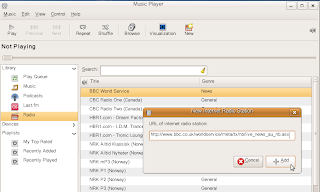
Online radio in Rhythmbox: Rhythmbox media player can play online radio and can subscribe to podcast feeds.
Open Rhythmbox.
Click Music >> New Internet Radio Station (or press Ctrl+i)
Now add the following URL into the box and click Add
http://www.bbc.co.uk/worldservice/meta/tx/nb/live_news_au_nb.asx
Now the radio will be added to your list.You can right click and edit name etc.
Online radio in Rhythmbox: Rhythmbox media player can play online radio and can subscribe to podcast feeds.
Open Rhythmbox.
Click Music >> New Internet Radio Station (or press Ctrl+i)
Now add the following URL into the box and click Add
http://www.bbc.co.uk/worldservice/meta/tx/nb/live_news_au_nb.asx
Now the radio will be added to your list.You can right click and edit name etc.
